
Forklift App: one search for everything
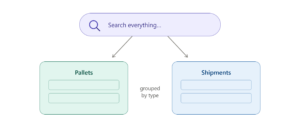
This is the one you’ve been waiting for. Now you can find everything from a single search bar — no jumping between screens, no searching pallets and shipments separately. You type, and it’s all in one place.
Need to narrow it down? Filter to exactly what you’re after — by pallet ID, marker, location, or shipment ID — and your results line up in neat groups by type. And when you need to jump back to something you saw earlier, your recent items are right there waiting.
Capture evidence before you close
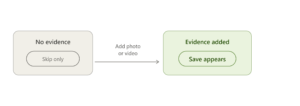
The proof of-shipment step now encourages you to add evidence before finishing a load. If nothing’s attached, the only option is Skip the Save button appears only once you add a photo or video. That way, whenever evidence exists, it’s always saved.
Pallet ID on shared evidence
The shared evidence page now shows the pallet’s ID, so anyone you share it with knows exactly which pallet they’re looking at. It appears across the shared public page, and the evidence views in the Ops app, Forklift app, and Back Office.
Clearer loading counters
We aligned the gate panel counters with the rest of the system. Valid loads complete or partial show in black, and only real problems like an overload or a mismatch turn red. No more double red that left you guessing.