
Multi-Manifest automatic shipment recognition
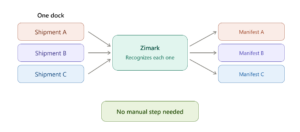
The next step up from Merge. Before, you merged manifests yourself. Now the system recognizes different shipments on the same dock on its own and assigns each one to the right manifest — no manual step needed.
WMS Comparison
Upload a snapshot from your WMS and compare it against what Zimark actually recorded on the floor, pallet by pallet. Mismatches are flagged so you can spot errors or missing items right away. Zimark doesn’t change your WMS — it shows you the gaps so your team can act on them.
Client Data Filtering
The system now shows which client owns each pallet. Filter by client name to see only their pallets useful for tracking how much storage each client takes up, deciding whether you have room for more clients, and answering client questions on the spot. It also makes pulling client reports quick and simple.
Shipment Complete confirmation
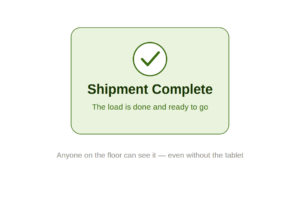
A clear “Shipment Complete” screen now lets you know when a shipment has finished successfully. Anyone on the floor — including drivers working without the tablet — can see the load is done and ready to go. A small touch that’s good for the workflow, and a nice way to mark the win.
Faster video loading
We upgraded the camera connection and improved video loading speeds, for a faster, smoother experience.
Merge shipments right at the gate
Loading a truck and another order shows up at the same gate? No need to stop and start over. Add the new order to the active manifest and keep working. You can merge up to three shipments into one organized list.
Loading outside the gate? Merge the shipments and mark the load as Outdoor all activity remains fully logged.
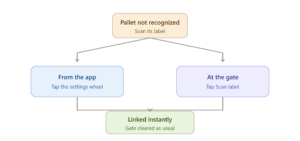
Pallet not recognized? Scan and keep going
If the system didn’t read a pallet label correctly, just scan its warehouse label with the tablet camera. The manual scan handles the coupling right from the tablet, and the pallet links to the system instantly and clears the gate as usual.
There are two ways to do it:
Re-identify from the app
Tap the settings wheel to open the camera, then scan the label. You’ll see “Your label was added successfully.”
Re-identify at the gate
Tap “Scan label” next to the pallet, open the camera, and scan it. You’ll see “Pallet label was identified successfully.”
Either way, make sure to capture both the marker and the pallet barcode in the same frame.
One report, all the proof.
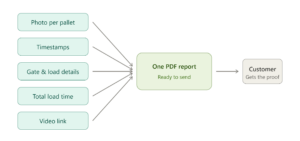
Before, you could only share one piece of evidence at a time. Now all the evidence for each shipment in one organized PDF report, ready to send to the customer receiving the load. Inside: a photo of each pallet, gate and load details, timestamps, and total load time.
Want more? A link in the report opens the video of the load, and scanning each pallet’s QR code shows its evidence directly.
¿Hablas español?
The app now speaks Spanish too, alongside English and Hebrew. Each user picks their own language from the language menu at the top of the screen, anytime.
Want to switch the language on your Dock Door screens as well? That’s set at the site level just talk to your Zimark Account Manager.

Unknown? Scan and keep going
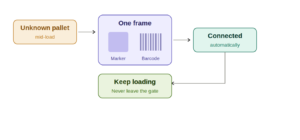
The big one this month. When an unknown marker shows up mid-load, you no longer have to stop everything — leave the gate, reprint labels, connect offline, and walk back. Now you fix it on the spot, straight from the Zimark Operational App.
Just tap Scan Label on the pallet’s row in the app, point the camera so the Zimark marker and your WMS barcode are in the same frame, and hit Take Frame. Zimark reads the codes and connects them for you automatically. Once it’s done, you’ll see “You are now ready to proceed loading” — and you keep going, without ever leaving the loading area.
You’ll find Scan Label wherever an unknown pallet appears — on the shipment page, the gate dashboard, and the pallet page. (Your admin can turn the feature on from the Back Office.)
From shipment straight to gate
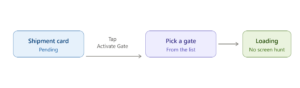
You think in shipments, but the work happens at the gate — so now you can bridge the two without switching screens. On any pending shipment, tap Activate Gate right from the shipment card, pick an available gate from the list, and you’re loading. No more hunting for the gate screen mid-flow.
Cross-dock – goods that pass straight through
Until now, Forklift Vision only recorded moves to and from rack locations. A move from one floor location to another would not be registered. Now, cross-dock moves that don’t involve racks are also recorded. So if a pallet is picked off the floor and put back down on the floor, there’s a record of the move. It will show up in your timelines, event logs, and audit records, just like any other location change, so nothing slips through the cracks. If your facility offers cross-docking — moving pallets across the floor with a fast turnaround — this one’s for you.
Forklift App: one search for everything
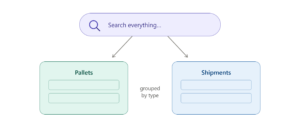
This is the one you’ve been waiting for. Now you can find everything from a single search bar — no jumping between screens, no searching pallets and shipments separately. You type, and it’s all in one place.
Need to narrow it down? Filter to exactly what you’re after — by pallet ID, marker, location, or shipment ID — and your results line up in neat groups by type. And when you need to jump back to something you saw earlier, your recent items are right there waiting.
Capture evidence before you close
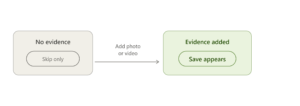
The proof of-shipment step now encourages you to add evidence before finishing a load. If nothing’s attached, the only option is Skip the Save button appears only once you add a photo or video. That way, whenever evidence exists, it’s always saved.
Pallet ID on shared evidence
The shared evidence page now shows the pallet’s ID, so anyone you share it with knows exactly which pallet they’re looking at. It appears across the shared public page, and the evidence views in the Ops app, Forklift app, and Back Office.
Clearer loading counters
We aligned the gate panel counters with the rest of the system. Valid loads complete or partial show in black, and only real problems like an overload or a mismatch turn red. No more double red that left you guessing.
A little gift from Santa’s favorite logistics team
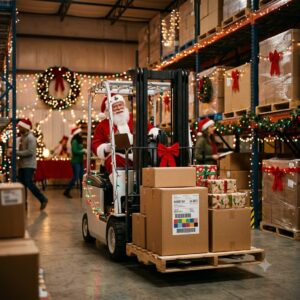
Word from the North Pole: you’ve been on the Nice List this year. So our elves rolled up their sleeves and built a special holiday release — just for the busiest operation of the season. Here’s what’s waiting under the tree.
Reindeer-and-sleigh camera height 🦌
Regular Zimark cameras are set for the height of a truck. But a sleigh pulled by nine reindeer flies a whole lot higher — so we added the option to raise the camera even further, making sure every present stays in frame, even mid-air with Rudolph leading the way.
North Pole network support ❄️
Turns out the Wi-Fi at the top of the world is a bit frosty. We added long-range, low-latency support so Arctic warehouses stay connected — even when the nearest server is several thousand frozen miles away.
Nice List / Naughty List verification ✅
Every present is now checked against the official List right at the gate. Nice? Loaded, tracked, and on its way. Naughty? Flagged for review. No coal leaves the dock without proof of delivery.
Wrapped-present support 🎁
Pallets are great, but they don’t fit down chimneys. Zimark now tracks wrapped presents of every shape and size — bows, ribbons, and all — with the same loving care we give every shipment.
Wishing you a very Merry Christmas from all of us at Zimark. May your loading be merry, and your gates be bright 🎅.
Hebrew language support
The Zimark Operational App now fully supports Hebrew. Switch to it anytime from the language settings menu.
Mobile Back Office
Manage and run your manifests straight from your phone. Create and edit manifests in the field, no computer needed, with touch-friendly menus that let you react to changes in real time.
QR code login
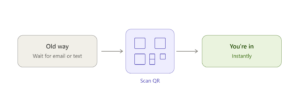
A faster way in. Instead of waiting for an email or text link, just scan a QR code to enter your organization instantly.
Excel export
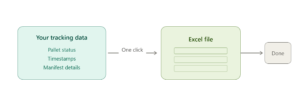
Need your data out? One click exports your tracking data pallet status, timestamps, manifest details into an organized Excel file.
Privacy & data transparency
The first time you log in, a privacy screen puts you in control of usage-data collection — choose to accept or decline tracking, your call.