
Merge shipments right at the gate
Loading a truck and another order shows up at the same gate? No need to stop and start over. Add the new order to the active manifest and keep working. You can merge up to three shipments into one organized list.
Loading outside the gate? Merge the shipments and mark the load as Outdoor all activity remains fully logged.
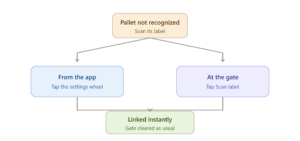
Pallet not recognized? Scan and keep going
If the system didn’t read a pallet label correctly, just scan its warehouse label with the tablet camera. The manual scan handles the coupling right from the tablet, and the pallet links to the system instantly and clears the gate as usual.
There are two ways to do it:
Re-identify from the app
Tap the settings wheel to open the camera, then scan the label. You’ll see “Your label was added successfully.”
Re-identify at the gate
Tap “Scan label” next to the pallet, open the camera, and scan it. You’ll see “Pallet label was identified successfully.”
Either way, make sure to capture both the marker and the pallet barcode in the same frame.
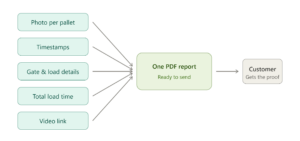
One report, all the proof.
Before, you could only share one piece of evidence at a time. Now all the evidence for each shipment in one organized PDF report, ready to send to the customer receiving the load. Inside: a photo of each pallet, gate and load details, timestamps, and total load time.
Want more? A link in the report opens the video of the load, and scanning each pallet’s QR code shows its evidence directly.
¿Hablas español?
The app now speaks Spanish too, alongside English and Hebrew. Each user picks their own language from the language menu at the top of the screen, anytime.
Want to switch the language on your Dock Door screens as well? That’s set at the site level just talk to your Zimark Account Manager.
