
Unknown? Scan and keep going
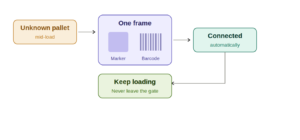
The big one this month. When an unknown marker shows up mid-load, you no longer have to stop everything — leave the gate, reprint labels, connect offline, and walk back. Now you fix it on the spot, straight from the Zimark Operational App.
Just tap Scan Label on the pallet’s row in the app, point the camera so the Zimark marker and your WMS barcode are in the same frame, and hit Take Frame. Zimark reads the codes and connects them for you automatically. Once it’s done, you’ll see “You are now ready to proceed loading” — and you keep going, without ever leaving the loading area.
You’ll find Scan Label wherever an unknown pallet appears — on the shipment page, the gate dashboard, and the pallet page. (Your admin can turn the feature on from the Back Office.)
From shipment straight to gate
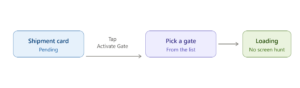
You think in shipments, but the work happens at the gate — so now you can bridge the two without switching screens. On any pending shipment, tap Activate Gate right from the shipment card, pick an available gate from the list, and you’re loading. No more hunting for the gate screen mid-flow.
Cross-dock – goods that pass straight through
Until now, Forklift Vision only recorded moves to and from rack locations. A move from one floor location to another would not be registered. Now, cross-dock moves that don’t involve racks are also recorded. So if a pallet is picked off the floor and put back down on the floor, there’s a record of the move. It will show up in your timelines, event logs, and audit records, just like any other location change, so nothing slips through the cracks. If your facility offers cross-docking — moving pallets across the floor with a fast turnaround — this one’s for you.